MCP Interface
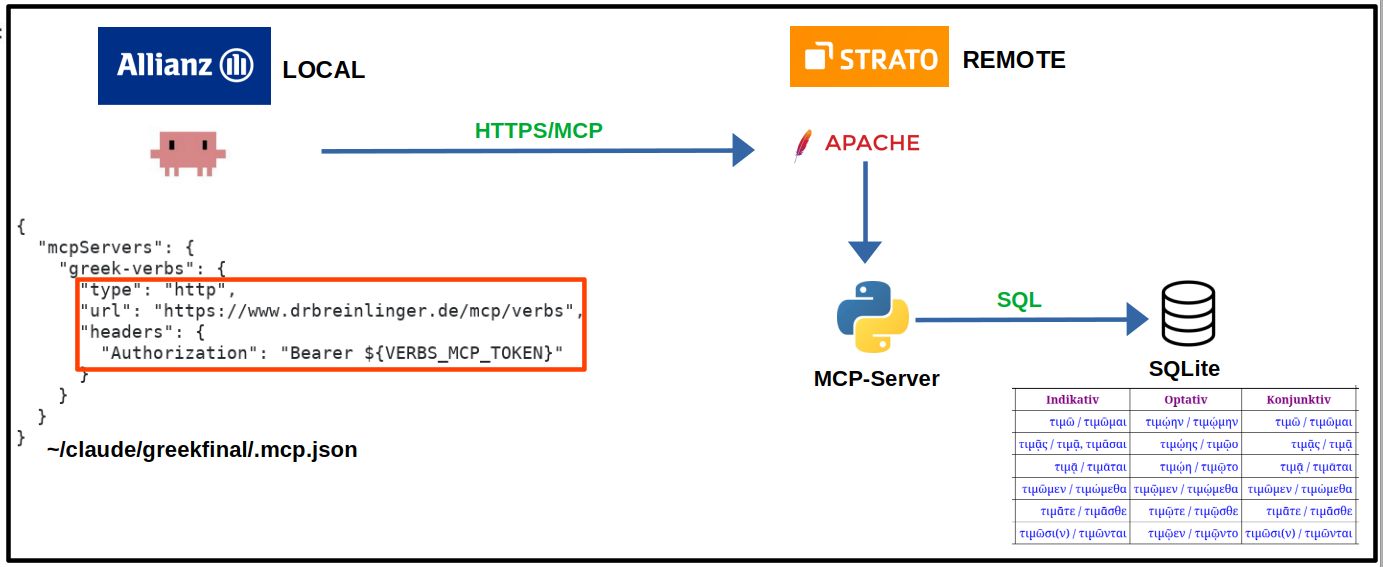
- Resource:
verbs://schema - Tool:
get_database_schema() - Tool:
query_sql(sql)
The database schema was explicitly known. In addition, the semantics of
rowid 1..6 were explicitly defined.
Model Context Protocol · SQLite · Claude Code · ChatGPT/Codex · Apache
The essential step in connecting an arbitrary database to an LLM through MCP is not the transport or the client configuration, but the semantic modelling of the database. In this architecture that knowledge is encapsulated in a separate YAML file: describing tables, columns, identifiers, meanings, synonyms, units, and conventions is the actual one-time effort. Once this semantic model exists, the same database can be queried in natural language through a local or remote MCP server, while the client-side setup becomes almost trivial. The five stages below evolve from a local SQLite MCP server through CGI intermediates to a fully remote MCP server behind Apache and systemd, and finally to a consolidated multi-database service with one shared runtime and a central database.yaml registry.
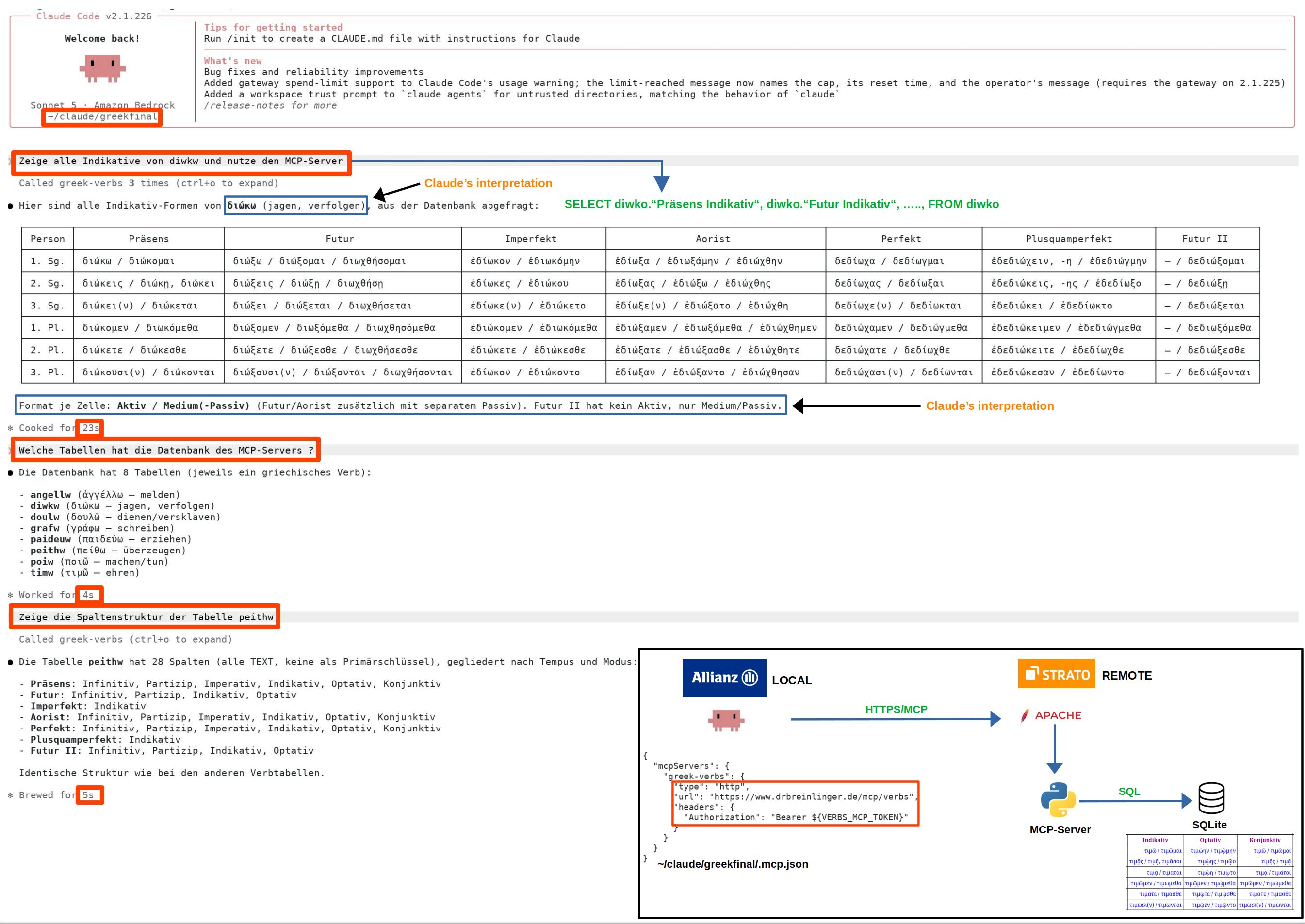
The MCP server presented here in five evolution stages makes it possible to query an SQLite database in natural language through an MCP client such as Claude Code, or ChatGPT/Codex. The decisive prerequisite is a semantic model of the database rather than client-specific code. We keep that model in a self-contained YAML file, so the database-specific knowledge is cleanly separated from the generic MCP server. The user does not need SQL knowledge: the LLM interprets the task, uses the semantic description to understand the schema, determines the required tables and columns, generates the necessary SQL statements, and presents the result as a useful view of the data.
database:
  name: finance.db
  hint: Dezimaltrenner ist ein Punkt. Es gibt keinen Tausendertrenner. Währungseinheit ist EUR.
  description: Finanz-, Budget-, Vertrags-, Aufwands- und Zeitkartendaten
tables:
  Budgets: #{{{{
    description: Budgets für Teams je Projekt
    synonyms:
      - Budget
      - Geld
      - Mittel
      - Zuweisung
      - budgets
      - funds
      - allocation
    columns:
      tbwla:
        description: Bezeichner des Gremiums, zu welchem ein Projekt gehört.
      scopeid:
        description: Identifier eines Scope (reine Ziffernfolge)
        synonyms:
          - Projektnummer
          - project number
          - scope id
      scope:
        description: Name eines Projektes
        synonyms:
          - Projekt
          - project
          - project name
      team:
        description: Einheit, welcher genehmigtes, geplantes und verbrauchtes Budget zugeordnet sind
        synonyms:
          - Abteilung
          - senior-chapter
          - Referat
          - Chapter
          - Einheit
          - department
          - unit
          - organizational unit
          - chapter
      status:
        description: Status der Genehmigung eines Projektes
        synonyms:
          - approval status
          - project status
      fplegen:
        description: genehmigtes Budget (EUR netto)
        synonyms:
          - genehmigtes Budget
          - Soll
          - approved budget
          - authorized budget
      fpleav:
        description: geplantes, aber noch nicht genehmigtes Budget (EUR netto)
        synonyms:
          - geplantes Budget
          - Arbeitsversion
          - planned budget
          - unapproved budget
          - budget draft
      ist:
        description: verbrauchtes, gebuchtes Budget (EUR netto)
        synonyms:
          - Ist
          - Buchung
          - Verbrauch
          - actual
          - actuals
          - consumed budget
          - booked budget
          - budget consumption
      wbs:
        description: Zu scopeid alternativer Identifier eines Scope (Buchstaben, Ziffern, Bindestrich, Schrägstrich)
        synonyms:
          - wbs-Element
          - wbs-id
          - WBS element
          - WBS id
      scv:
        description: Scope-Verantwortlicher, d.h. Projektleiter
        synonyms:
          - Scope-Verantwortlicher
          - Projektleiter
          - scope owner
          - project manager
          - project lead
  #}}}}
  Chargings: #{{{{
    description: Gibt diejenigen Werte an, mit welchen Kosten aus Stundenmeldungen berechnet werden, wenn ein Mitarbeiter das Modell in Spalte model hat. Alle Zahlenformate sind englisch, mit einem Punkt als Dezimal- und keinem Tausendertrenner.
    use: false
  #}}}}
  Contracts: #{{{{
    synonyms:
      - Vertraege
      - contracts
      - agreements
    description: Tabelle aller Mitarbeiter und der Stammdaten eines Vertrages mit einem bestimmten Dienstleister oder Provider. Alle Zahlenformate sind englisch, mit einem Punkt als Dezimal- und keinem Tausendertrenner.
    columns:
      contract:
        synonyms:
          - Provider
          - Dienstleister
          - Firma
          - provider
          - service provider
          - vendor
          - company
        description: Bezeichner eines Vertrags.
      resource:
        synonyms:
          - employee
          - staff member
          - consultant
          - user
        description: Vor und Nachname eines Mitarbeiters. Diese Spalte ist identisch mit Spalte user in Tabelle Resources.
      shore:
        synonyms:
          - shoring
          - onshore
          - nearshore
          - offshore
        description: Angabe, ob ein externer Mitarbeiter in Deutschland (onshore) oder einem als nearshore oder offshore klassifizierten Land arbeitet. Diese Spalte entspricht Spalte shore in Tabelle Resources.
      location:
        synonyms:
          - Land
          - country
          - location
          - work location
        description: Land, in welchem ein Mitarbeiter arbeitet
      role:
        synonyms:
          - job role
          - function
        description: Rollenbezeichnung eines Mitarbeiters, z.B. developer (Entwickler)
      category:
        synonyms:
          - role category
          - classification
        description: Klassifikation der Rolle des Mitarbeiters, z.B. ist SC7 eine Entwicklungstätigkeit
      skill:
        synonyms:
          - Befaehigung
          - Qualifikation
          - skill
          - qualification
          - proficiency level
        description: Befähigungsstufe, z.B. Expert
      year:
        synonyms:
          - contract year
        description: Jahr des Vertrags im Format yyyy
      dayrate_Eur:
        synonyms:
          - Tagessatz
          - day rate
          - daily rate
        description: Tagessatz netto in EUR. Das Zahlenformat ist englisch, mit einem Punkt als Dezimal- und keinem Tausendertrenner.
      volume_days:
        synonyms:
          - Volumen
          - Anzahl Tage
          - volume
          - number of days
          - contracted days
        description: Anzahl Tage des Mitarbeiters im jeweiligen Jahr des Vertrages. Das Format ist eine Ganzzahl.
      nettotal_Eur:
        synonyms:
          - Nettokosten
          - net costs
          - net total
          - total contract cost
        description: Gesamtkosten netto eines Mitarbeiters im jeweiligen Jahr des Vertrages als Produkt aus dayrate_Eur und volume_days. Englisches Zahlenformat mit Punkt als Dezimaltrenner und keinem Tausendertrenner.
      hourly_rate_Eur:
        synonyms:
          - Stundensatz
          - hourly rate
        description: Stundensatz netto eines Mitarbeiters im jeweiligen Jahr des Vertrages als Quotient aus dayrate_Eur und 8.0. Englisches Zahlenformat mit Punkt als Dezimaltrenner und keinem Tausendertrenner.
      resplan_hours:
        synonyms:
          - Ressourcenplan Stunden
          - resource plan hours
          - planned hours
        description: Anzahl Stunden, welche für den Mitarbeiter im System geplant werden müssen als Produkt aus volume_days und 8.0. Englisches Zahlenformat mit Punkt als Dezimaltrenner und keinem Tausendertrenner.
      transition_days:
        synonyms:
          - Übergangstage
          - transition days
          - free days
          - non-billable days
        description: Anzahl der sogenannten Übergangstage. Das sind unentgeltliche Tage.
      span:
        synonyms:
          - Spanne
          - contract duration
          - contract period
          - span
        description: Zeitdauer eines Vertrags in Jahren. Format ist entweder yyyy oder yyyy-yyyy
      gbuy:
        synonyms:
          - GBUY number
          - GBUY id
        description: sogenannte GBUY-Nummer eines Vertrages. Die GBUY-Nummer wurde bei Beantragung eines Vertrages vergeben.
      fglass:
        synonyms:
          - Fieldglass
          - Fieldglass-ID
          - Fieldglass number
          - Fieldglass id
        description: sogenannte Fieldglass-Nummer eines Vertrags
      fglass_approval:
        synonyms:
          - Fieldglass approval
          - Fieldglass approval date
        description: Datum der Fieldglass-Genehmigung. Zahlformat ist mm/dd/yyyy.
      pnumber:
        synonyms:
          - purchase order number
        description: sogenannte 'purchase order number' eines Vertrags. Das ist eine eindeutige ID, welche Spalte porder in Tabelle Efforts entspricht.
      porder:
        synonyms:
          - purchase order
          - PO
        description: sogenannte 'purchase order' eines Vertrages. Diese Spalte ist nicht identisch mit Spalte porder in Tabelle Efforts.
      pol:
        synonyms:
          - purchase order line
          - purchase order line number
          - PO line
        description: sogenannte 'purchase order line number' eines Vertrages.
      srf_id:
        synonyms:
          - SRF id
          - SRF number
        description: sogenannte srf-id des sogenannten TPRM-Prozesses zu einem Vertrag
      tprm_id:
        synonyms:
          - TPRM id
          - TPRM number
        description: sogenannte TPRM-ID des TPRM-Prozesses zu einem Vertrag
      sourcing_project_id:
        synonyms:
          - sourcing id
          - sourcing project id
        description: sogenannte 'sourcing project id' eines Vertrages
      cw_id:
        synonyms:
          - workspace id
          - current workspace id
          - cw-id
          - Vertragsnummer
          - contract number
          - workspace id
          - current workspace id
        description: sogenannte "workspace id" eines Vertrages
      cw_id_master:
        synonyms:
          - workspace id des masters
          - current workspace id des masters
          - cw-id des masters
          - Rahmenvertragsnummer
          - master contract number
          - master workspace id
          - master current workspace id
        description: sogenannte "workspace id" des einem Vertrag übergeordneten Rahmenvertrages
      tprm_iso:
        synonyms:
          - information security officer
          - ISO
        description: Name des 'information security officers', welcher dem sogenannten TPRM-Prozess eines Vertrages zugeordnet ist
      procurement:
        synonyms:
          - purchasing
          - buyer
        description: Name des Mitarbeiters bei Einkauf (procurement), welcher für den Vertrag zuständig ist
      contact:
        synonyms:
          - account manager
          - provider contact
          - vendor contact
        description: Name des 'account managers' beim Vertragspartner (Provider, Dienstleister)
  #}}}}
  Contractscommon: #{{{{
    use : false
  #}}}}
  Efforts: #{{{{
    synonyms:
      - weekly efforts
      - Ablastung
      - Weiterverrechnung
      - weekly expenses
      - weekly charges
      - chargeback
      - cost allocation
    description: wöchentliche Aufwände je Mitarbeiter, welche dispatched oder noch nicht dispatched wurden. dispatched ist der Fachbegriff für weiterverrechnet. Jede Zeile entspricht der Ablastung eines (hier anonymisierten) Mitarbeiters. Alle Zahlenformate sind englisch mit einem Punkt als Dezimaltrenner und keinem Tausendertrenner.
    columns:
      division:
        synonyms:
          - Fachbereich
          - division
          - business unit
        description: Ein Fachbereich hat mehrere Abteilungen. Eine Abteilung hat mehrere Referate. Teams sind Mitarbeiter aus einem oder mehreren Referaten.
      department:
        synonyms:
          - Abteilung
          - department
        description:  Eine Abteilung hat mehrere Referate. Teams sind Mitarbeiter aus einem oder mehreren Referaten.
      team:
        description: Name für eine Gruppe von Mitarbeitern aus einem oder mehreren Referaten, welche an einem Projekt arbeiten
        synonyms:
          - Abteilung
          - senior-chapter
          - Referat
          - Chapter
          - Einheit
          - department
          - unit
          - organizational unit
          - chapter
      contract:
        synonyms:
          - internal/external
          - employment type
          - worker type
        description: Angabe, ob ein Mitarbeiter intern oder extern ist
      shoring:
        synonyms:
          - shore
          - onshore
          - nearshore
          - offshore
        description: Angabe, ob ein externer Mitarbeiter in Deutschland (ON) oder einem als nearshore (NEAR) oder offshore (OFF) klassifizierten Land arbeitet. Diese Spalte entspricht nicht Spalte shore in den Tabellen Contracts und Resources, denn sie hat andere Ausprägungen (OFF, NEAR, ON anstelle offshore, nearshore, onshore).
      topic:
        synonyms:
          - contract type
          - billing type
          - time and material
          - fixed price
        description: Angabe, ob die Ablastung sich auf einen Time/Material-Vertrag (VAT) oder Fixpreisvertrag (Fixed Price) bezieht
      porder:
        synonyms:
          - purchase order
          - PO
          - purchase order number
        description: sogenannte 'purchase order' eines Vertrags. Das ist eine eindeutige ID, welche Spalte pnumber, nicht Spalte porder in Tabelle Contracts entspricht.
      provider:
        synonyms:
          - Dienstleister
          - Firma
          - service provider
          - vendor
          - company
        description: Name einer Firma, zu welcher ein externer Mitarbeiter gehört. Diese Spalte ist nicht identisch mit Spalte contract in Tabelle Contracts.
      todispatch:
        synonyms:
          - noch abzulasten
          - noch weiterzuverrechnen
          - to be dispatched
          - not yet dispatched
          - pending dispatch
          - pending chargeback
        description: Betrag, welcher noch abzulasten/weiterzuverrechnen ist. Das Zahlenformat ist englisch mit einem Punkt als Dezimaltrenner und keinem Tausendertrenner
      dispatched:
        synonyms:
          - abgelastet
          - weiterverrechnet
          - dispatched
          - already dispatched
          - charged back
          - allocated costs
        description: Betrag, welcher bereits abgelastet/weiterverrechnet wurde. Das Zahlenformat ist englisch mit einem Punkt als Dezimaltrenner und keinem Tausendertrenner
  # }}}}
  Resources: #{{{{
    use: false
  #}}}}
  Timecards: #{{{{
    synonyms:
      - Zeitkarten
      - Stundenbuchungen
      - timecards
      - timesheets
      - time bookings
      - hours booked
    description: Liste aller Stundenbuchungen je Mitarbeiter und Woche, der sogenannten Zeitkarten. Jede Zeile ist eine Zeitkarte, d.h. eine Wochenbuchung an Stunden.
    columns:
      month:
        synonyms:
          - month
          - booking month
        description: der Zeitkarte zugeordneter Monat im Format yyyy-mm
      week:
        synonyms:
          - week
          - week start
          - week starting
        description: Anfangstag der Woche einer Zeitkarte im Format yyyy-mm-dd
      team:
        synonyms:
          - Abteilung
          - senior-chapter
          - Referat
          - Chapter
          - Einheit
          - department
          - unit
          - organizational unit
          - chapter
        description: Team, zu welchem ein Mitarbeiter gehört. Teams können sein Chapter, Referate, Abteilungen, Senior-Chapter oder Projektteams.
      user:
        synonyms:
          - resource
          - Mitarbeiter
          - Interner
          - Externer
          - employee
          - resource
          - staff member
          - internal employee
          - external employee
          - contractor
        description: Vorname und Nachname eines Mitarbeiters.
      total:
        synonyms:
          - hours
          - total hours
          - booked hours
        description: Anzahl Stunden der Zeitkarte. Gleitkommazahl mit englischem Dezimaltrenner und keinem Tausendertrenner.
      state:
        synonyms:
          - Status
          - state
          - booking status
          - approval status
        description: Status einer Buchung. Möglich sind folgende Statuswerte und deren Synonyme.
        values:
          pending: offen
          approved: genehmigt
          processed: verarbeitet
          disabled: verworfen, ungueltig
      rate:
        synonyms:
          - Tagessatz
          - dayrate
          - day rate
          - daily rate
        description: Tagessatz brutto in EUR. Dezimaltrenner ist ein Punkt. Kein Tausendertrenner.
      intext:
        synonyms:
          - internal/external
          - employee type
          - worker type
        description: Bezeichnung, ob ein Mitarbeiter intern (Angestellter der Allianz) oder extern (Vertrag bei einem Provider/Dienstleister) ist.
      shore:
        synonyms:
          - shoring
          - onshore
          - nearshore
          - offshore
        description: Angabe, ob ein externer Mitarbeiter in Deutschland (onshore) oder einem als nearshore oder offshore klassifizierten Land arbeitet. Diese Spalte entspricht Spalte shore aus Tabelle Contracts.
      model:
        synonyms:
          - Modell
          - Abrechnungsmodell
          - Verrechnungsmodell
          - Typ
          - Variante
          - billing model
          - charging model
          - cost model
        description: Abrechnungsmodell.
      contract:
        synonyms:
          - contract
          - agreement
        description: Name des Vertrags bei einem externen Mitarbeiter
      correction:
        synonyms:
          - Korrektur
          - Korrekturwert
          - Korrekturfaktor
          - correction
          - correction value
          - correction factor
        description: Korrekturwert zur Berechnung von Spalte charged
      app:
        synonyms:
          - Arbeitsplatzpauschale
          - workplace allowance
          - workplace charge
        description: Arbeitsplatzpauschale fällt bei externen Mitarbeitern je 8 Stunden an und dient der Berechnung von Spalte charged
      overhead:
        synonyms:
          - Zuschlag
          - overhead
          - surcharge
        description: Der Overhead dient der Berechnung von Spalte charged
      markup:
        synonyms:
          - markup
          - surcharge
        description: Das Markup dient der Berechnung von Spalte charged
      vat:
        synonyms:
          - Mehrwertsteuer
          - MwSt
          - VAT
          - value added tax
        description: Die Mehrwertsteuer wird nicht verwendet
      charged:
        synonyms:
          - in Rechnung gestellt
          - gebucht
          - Kosten
          - Geldbetrag
          - charged
          - billed
          - invoiced
          - costs
          - amount charged
        description: In Rechnung gestellter Wert der Zeitkarte in der Einheit EUR als Gleitkommazahl mit englischem Dezimaltrenner und keinem Tausendertrenner.
  #}}}}
The YAML example above describes the semantic structure of a financial database
and is independent of the Ancient Greek database used in the MCP implementation
below. The running MCP example is a database for the conjugation of Ancient Greek
verb classes. It consists of eight wide tables with the same basic structure, one
table for each verb or conjugation class
(paideuw, poiw, timw,
doulw, diwkw, grafw,
peithw, and angellw). The following image shows
the first columns of the table for παιδεύω
(paideuw) as they might be displayed on a conventional website.

paideuw: present-tense forms of the
παιδεύω conjugation class in a conventional tabular web view.
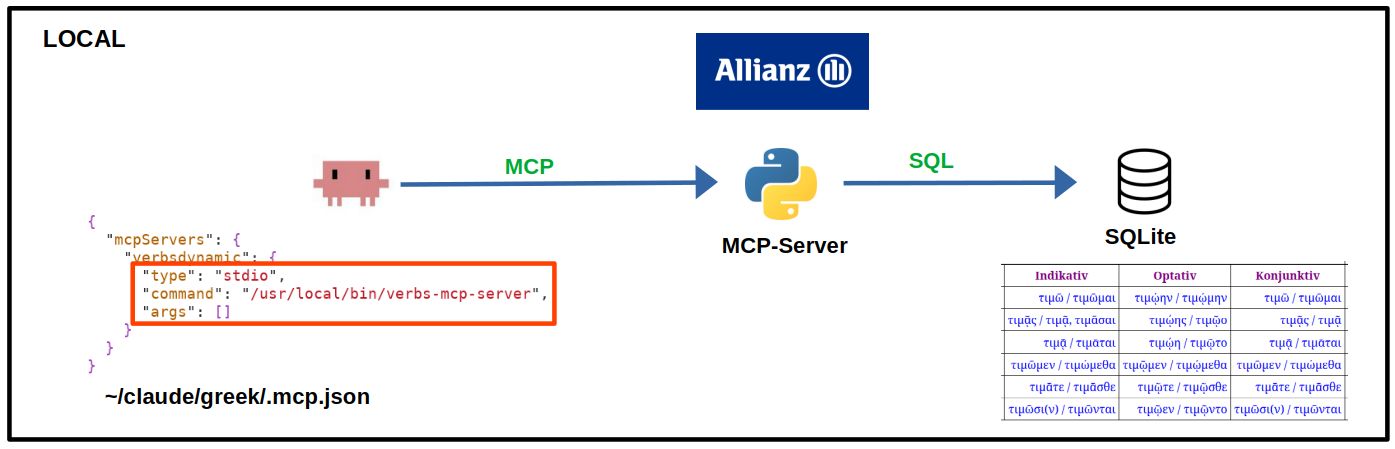
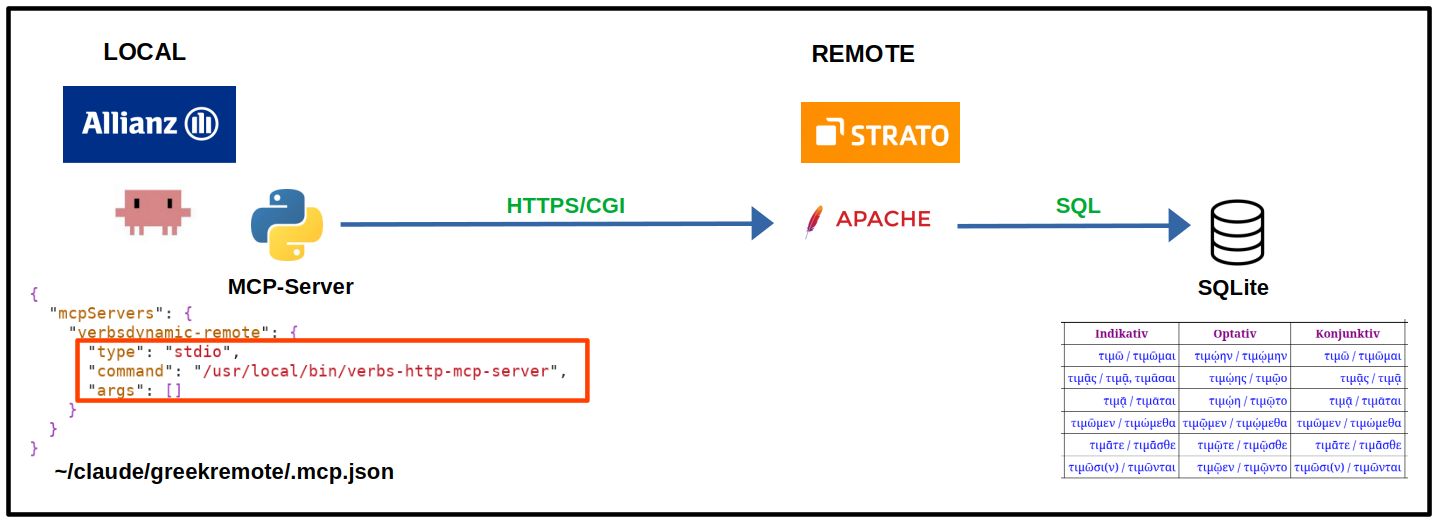
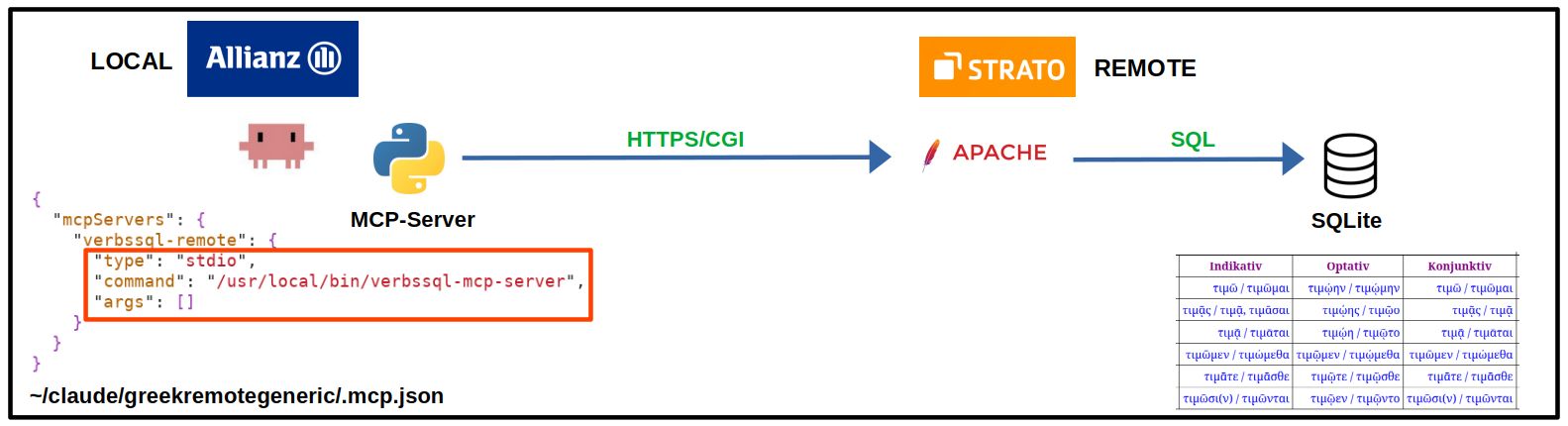
database.yaml maps logical endpoint names to the corresponding SQLite database and semantic YAML file. Apache keeps the public per-database URLs and authentication boundaries, but routes them to separate MCP mounts inside the same process.
The five variants therefore show a gradual separation of client, MCP protocol,
data access, and web infrastructure. At the same time, the MCP implementation becomes
increasingly generic: first the schema knowledge is moved into a semantic YAML model;
finally even the database-specific server processes disappear and are replaced by
declarative entries in a central database.yaml.
Claude Code starts a local MCP server via stdio; the SQLite database is local.
The MCP server remains local; the remote database is queried only through predefined table and column lists.
Claude discovers the schema and sends arbitrary read-only SQL to verbssql.sh.
MCP server and SQLite run together on the web server; only the client configuration remains local.
The simplest complete MCP setup: client, MCP server, and database are all local.
verbs://schemaget_database_schema()query_sql(sql)
The database schema was explicitly known. In addition, the semantics of
rowid 1..6 were explicitly defined.
file:...?mode=roPRAGMA query_only = ONSELECT/WITHSELECT
p."Präsens Indikativ",
t."Präsens Indikativ"
FROM poiw AS p
JOIN timw AS t ON t.rowid = p.rowid;/usr/local/bin/verbs-mcp-server
/usr/local/lib/verbs-mcp/
server.py
.venv/
/usr/local/share/verbs-mcp/
verbsdynamic.db
Project directory:
.mcp.json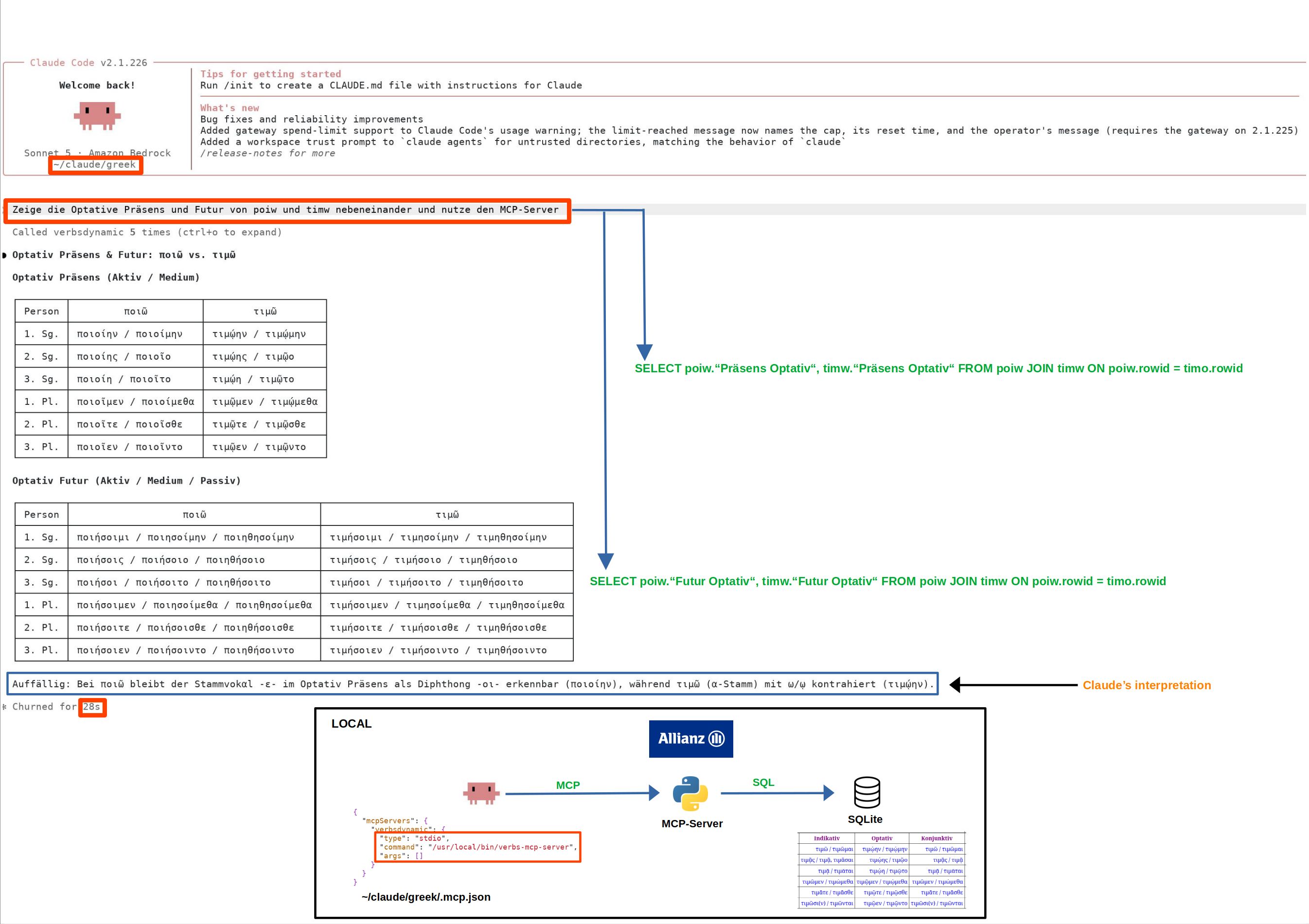
#!/usr/bin/env python3
"""Minimal read-only MCP server for verbsdynamic.db."""

from __future__ import annotations

import json
import os
import re
import sqlite3
from pathlib import Path
from typing import Any

from mcp.server import MCPServer

SERVER_NAME = "verbsdynamic"
DEFAULT_DB = Path("/usr/local/share/verbs-mcp/verbsdynamic.db")
DB_PATH = Path(os.environ.get("VERBSDYNAMIC_DB", str(DEFAULT_DB)))
MAX_ROWS = 200

mcp = MCPServer(SERVER_NAME)

ROW_SEMANTICS = {
    1: "1. Person Singular",
    2: "2. Person Singular",
    3: "3. Person Singular",
    4: "1. Person Plural",
    5: "2. Person Plural",
    6: "3. Person Plural",
}


def _connect() -> sqlite3.Connection:
    if not DB_PATH.is_file():
        raise RuntimeError(f"SQLite database not found: {DB_PATH}")

    # URI mode=ro makes the database read-only at SQLite level.
    con = sqlite3.connect(f"file:{DB_PATH}?mode=ro", uri=True)
    con.execute("PRAGMA query_only = ON")
    con.set_authorizer(_authorizer)
    return con


def _authorizer(action: int, arg1: str | None, arg2: str | None,
                dbname: str | None, source: str | None) -> int:
    """Allow only operations needed for SELECT queries."""
    allowed = {
        sqlite3.SQLITE_SELECT,
        sqlite3.SQLITE_READ,
        sqlite3.SQLITE_FUNCTION,
    }
    if hasattr(sqlite3, "SQLITE_RECURSIVE"):
        allowed.add(sqlite3.SQLITE_RECURSIVE)
    return sqlite3.SQLITE_OK if action in allowed else sqlite3.SQLITE_DENY


def _first_sql_keyword(sql: str) -> str:
    """Return first SQL keyword after leading whitespace/comments."""
    s = sql.lstrip()
    while True:
        if s.startswith("--"):
            nl = s.find("\n")
            s = "" if nl < 0 else s[nl + 1:].lstrip()
            continue
        if s.startswith("/*"):
            end = s.find("*/", 2)
            if end < 0:
                return ""
            s = s[end + 2:].lstrip()
            continue
        break
    m = re.match(r"([A-Za-z]+)", s)
    return m.group(1).upper() if m else ""


def _schema_dict() -> dict[str, Any]:
    with _connect() as con:
        tables = [
            row[0]
            for row in con.execute(
                "SELECT name FROM sqlite_master "
                "WHERE type='table' AND name NOT LIKE 'sqlite_%' ORDER BY name"
            )
        ]

        result: dict[str, Any] = {
            "database": str(DB_PATH),
            "semantics": {
                "one_table_per_verb": True,
                "rowid": ROW_SEMANTICS,
                "important": (
                    "All verb tables have the same column layout. "
                    "There is no explicit id/person column. SQLite rowid 1..6 "
                    "means 1sg, 2sg, 3sg, 1pl, 2pl, 3pl respectively. "
                    "Join different verb tables on rowid when comparing persons."
                ),
            },
            "tables": {},
        }

        for table in tables:
            quoted = table.replace('"', '""')
            cols = [
                {"name": row[1], "type": row[2] or ""}
                for row in con.execute(f'PRAGMA table_info("{quoted}")')
            ]
            count = con.execute(f'SELECT count(*) FROM "{quoted}"').fetchone()[0]
            result["tables"][table] = {"rows": count, "columns": cols}

        return result


@mcp.resource("verbs://schema", mime_type="application/json")
def database_schema_resource() -> str:
    """Schema and row semantics of the Ancient Greek verb database."""
    return json.dumps(_schema_dict(), ensure_ascii=False, indent=2)


@mcp.tool()
def get_database_schema() -> dict[str, Any]:
    """Return all verb tables, columns and row semantics before writing SQL.

    Use this when the user's question requires database access and the exact
    table/column names are not already known. Each table represents one verb.
    rowid 1..6 corresponds to 1sg, 2sg, 3sg, 1pl, 2pl, 3pl.
    """
    return _schema_dict()


@mcp.tool()
def query_sql(sql: str) -> dict[str, Any]:
    """Execute one read-only SELECT/WITH query against the verb database.

    The database contains one table per verb and equal schemas across tables.
    Use quoted identifiers for German column names, e.g.
    SELECT rowid, "Präsens Indikativ" FROM poiw ORDER BY rowid.
    To compare verbs, join tables on rowid. Only SELECT or WITH is accepted.
    At most 200 result rows are returned.
    """
    keyword = _first_sql_keyword(sql)
    if keyword not in {"SELECT", "WITH"}:
        raise ValueError("Only SELECT or WITH queries are allowed")

    with _connect() as con:
        cur = con.execute(sql)
        columns = [d[0] for d in cur.description] if cur.description else []
        rows = cur.fetchmany(MAX_ROWS + 1)

    truncated = len(rows) > MAX_ROWS
    if truncated:
        rows = rows[:MAX_ROWS]

    return {
        "columns": columns,
        "rows": [list(row) for row in rows],
        "row_count": len(rows),
        "truncated": truncated,
        "max_rows": MAX_ROWS,
    }


if __name__ == "__main__":
    mcp.run(transport="stdio")
verbsdynamic.shThe MCP process remains local, but the database and SQL logic now reside on the web server.
query_verbs(
  tables=["poiw", "timw"],
  tempora=[
    "Präsens Indikativ",
    "Aorist Indikativ"
  ]
)POST /cgi-bin/verbsdynamic.sh
tabelle=poiw,timw
tempus=Präsens Indikativ,Aorist Indikativ/usr/local/bin/verbs-http-mcp-server
/usr/local/lib/verbs-http-mcp/
server.py
.venv/
.mcp.json/cgi-bin/verbsdynamic.sh
/var/www/html/Public/Greek/verbsdynamic.db
Apache CGI configuration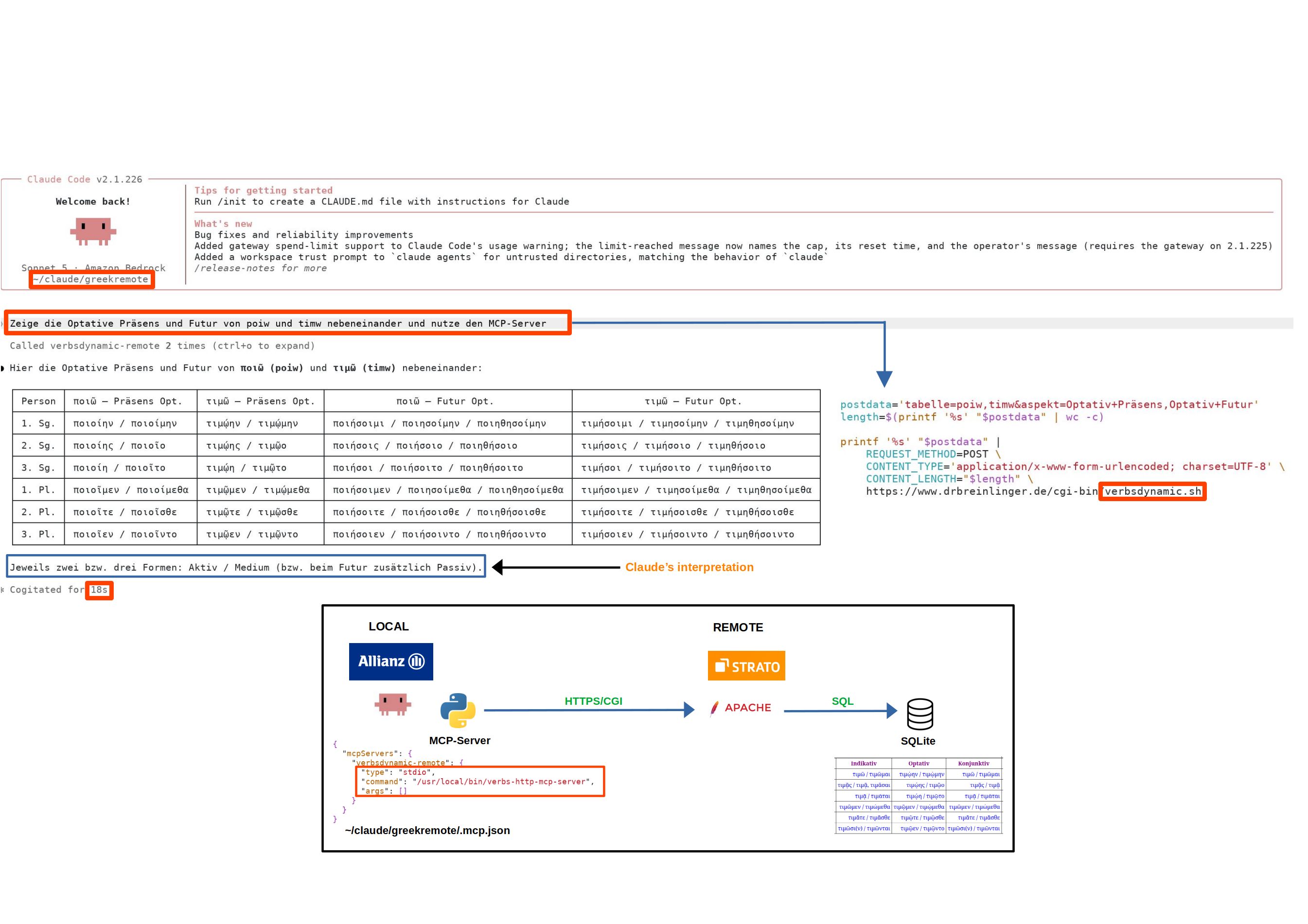
#!/usr/bin/env python3
"""Minimal MCP bridge to the remote verbsdynamic CGI service."""

from __future__ import annotations

import html
import json
import os
import ssl
from html.parser import HTMLParser
from typing import Any
from urllib.error import HTTPError, URLError
from urllib.parse import urlencode
from urllib.request import Request, urlopen

from mcp.server import MCPServer

SERVER_NAME = "verbsdynamic-remote"
DEFAULT_URL = "https://www.drbreinlinger.de/cgi-bin/verbsdynamic.sh"
SERVICE_URL = os.environ.get("VERBSDYNAMIC_URL", DEFAULT_URL)
TIMEOUT = float(os.environ.get("VERBSDYNAMIC_TIMEOUT", "15"))

mcp = MCPServer(SERVER_NAME)

VERBS = {
    "paideuw": "παιδεὐω",
    "poiw": "ποιῶ",
    "timw": "τιμῶ",
    "doulw": "δουλῶ",
    "diwkw": "διώκω",
    "grafw": "γρἀφω",
    "peithw": "πείθω",
    "angellw": "ἀγγέλλω",
}

TEMPORA = [
    "Präsens Infinitiv",
    "Präsens Partizip",
    "Präsens Imperativ",
    "Präsens Indikativ",
    "Präsens Optativ",
    "Präsens Konjunktiv",
    "Futur Infinitiv",
    "Futur Partizip",
    "Futur Indikativ",
    "Futur Optativ",
    "Imperfekt Indikativ",
    "Aorist Infinitiv",
    "Aorist Partizip",
    "Aorist Imperativ",
    "Aorist Indikativ",
    "Aorist Optativ",
    "Aorist Konjunktiv",
    "Perfekt Infinitiv",
    "Perfekt Partizip",
    "Perfekt Imperativ",
    "Perfekt Indikativ",
    "Perfekt Optativ",
    "Perfekt Konjunktiv",
    "Plusquamperfekt Indikativ",
    "Futur II Infinitiv",
    "Futur II Partizip",
    "Futur II Indikativ",
    "Futur II Optativ",
]

ROW_SEMANTICS = {
    1: "1. Person Singular",
    2: "2. Person Singular",
    3: "3. Person Singular",
    4: "1. Person Plural",
    5: "2. Person Plural",
    6: "3. Person Plural",
}


class _TableParser(HTMLParser):
    def __init__(self) -> None:
        super().__init__(convert_charrefs=True)
        self.in_table = False
        self.in_cell = False
        self.cell_kind: str | None = None
        self.cell_parts: list[str] = []
        self.current_row: list[tuple[str, str]] = []
        self.rows: list[list[tuple[str, str]]] = []

    def handle_starttag(self, tag: str, attrs: list[tuple[str, str | None]]) -> None:
        tag = tag.lower()
        if tag == "table" and not self.in_table:
            self.in_table = True
        elif self.in_table and tag == "tr":
            self.current_row = []
        elif self.in_table and tag in {"th", "td"}:
            self.in_cell = True
            self.cell_kind = tag
            self.cell_parts = []

    def handle_data(self, data: str) -> None:
        if self.in_cell:
            self.cell_parts.append(data)

    def handle_endtag(self, tag: str) -> None:
        tag = tag.lower()
        if self.in_table and tag in {"th", "td"} and self.in_cell:
            text = html.unescape("".join(self.cell_parts)).strip()
            self.current_row.append((self.cell_kind or "td", text))
            self.in_cell = False
            self.cell_kind = None
            self.cell_parts = []
        elif self.in_table and tag == "tr":
            if self.current_row:
                self.rows.append(self.current_row)
            self.current_row = []
        elif self.in_table and tag == "table":
            self.in_table = False


def _options() -> dict[str, Any]:
    return {
        "service_url": SERVICE_URL,
        "verbs": VERBS,
        "tempora": TEMPORA,
        "row_semantics": ROW_SEMANTICS,
        "protocol": {
            "method": "POST",
            "content_type": "application/x-www-form-urlencoded; charset=UTF-8",
            "fields": {
                "tabelle": "comma-separated table names",
                "tempus": "comma-separated column names",
            },
        },
    }


def _validate(tables: list[str], tempora: list[str]) -> tuple[list[str], list[str]]:
    if not tables:
        raise ValueError("At least one table/verb is required")
    if not tempora:
        raise ValueError("At least one tempus/column is required")

    bad_tables = [x for x in tables if x not in VERBS]
    if bad_tables:
        raise ValueError(f"Unknown table(s): {', '.join(bad_tables)}")

    bad_tempora = [x for x in tempora if x not in TEMPORA]
    if bad_tempora:
        raise ValueError(f"Unknown tempus/column(s): {', '.join(bad_tempora)}")

    # Preserve requested order while suppressing duplicates.
    tables = list(dict.fromkeys(tables))
    tempora = list(dict.fromkeys(tempora))
    return tables, tempora


def _ssl_context() -> ssl.SSLContext:
    """Create a verifying TLS context suitable for Zscaler-intercepted HTTPS.

    VERIFY_X509_PARTIAL_CHAIN keeps certificate and hostname verification
    enabled, but allows chain building to terminate at a trusted intermediate
    CA in the local trust store.
    """
    context = ssl.create_default_context()

    if hasattr(ssl, "VERIFY_X509_PARTIAL_CHAIN"):
        context.verify_flags |= ssl.VERIFY_X509_PARTIAL_CHAIN

    return context


def _post_query(tables: list[str], tempora: list[str]) -> str:
    data = urlencode({
        "tabelle": ",".join(tables),
        "tempus": ",".join(tempora),
    }).encode("utf-8")

    request = Request(
        SERVICE_URL,
        data=data,
        method="POST",
        headers={
            "Content-Type": "application/x-www-form-urlencoded; charset=UTF-8",
            "User-Agent": "verbsdynamic-mcp/1.0",
        },
    )

    try:
        with urlopen(request, timeout=TIMEOUT, context=_ssl_context()) as response:
            charset = response.headers.get_content_charset() or "utf-8"
            return response.read().decode(charset, errors="replace")
    except HTTPError as exc:
        body = exc.read().decode("utf-8", errors="replace")
        raise RuntimeError(f"CGI returned HTTP {exc.code}: {body[:500]}") from exc
    except URLError as exc:
        raise RuntimeError(f"Cannot reach CGI service {SERVICE_URL}: {exc.reason}") from exc


def _parse_table(document: str) -> dict[str, Any]:
    parser = _TableParser()
    parser.feed(document)

    if not parser.rows:
        raise RuntimeError(f"CGI response contains no HTML table: {document[:500]}")

    first = parser.rows[0]
    if first and all(kind == "th" for kind, _ in first):
        columns = [text for _, text in first]
        data_rows = parser.rows[1:]
    else:
        columns = []
        data_rows = parser.rows

    rows = [[text for _, text in row] for row in data_rows]

    return {
        "columns": columns,
        "rows": rows,
        "row_count": len(rows),
    }


@mcp.resource("verbsremote://schema", mime_type="application/json")
def query_options_resource() -> str:
    """Available verb tables, column names and CGI protocol."""
    return json.dumps(_options(), ensure_ascii=False, indent=2)


@mcp.tool()
def get_query_options() -> dict[str, Any]:
    """Return valid verb/table names and tempus/column names for the remote service."""
    return _options()


@mcp.tool()
def query_verbs(tables: list[str], tempora: list[str]) -> dict[str, Any]:
    """Query Ancient Greek verb forms through the remote verbsdynamic CGI service.

    'tables' contains one or more table identifiers such as ["poiw", "timw"].
    'tempora' contains one or more exact column names such as
    ["Präsens Indikativ", "Aorist Indikativ"].

    The tool sends the request as application/x-www-form-urlencoded using the
    CGI fields 'tabelle' and 'tempus', each as a comma-separated list.
    It converts the returned HTML table into structured columns and rows.
    """
    tables, tempora = _validate(tables, tempora)
    document = _post_query(tables, tempora)
    result = _parse_table(document)
    result.update({
        "tables": tables,
        "tempora": tempora,
        "row_semantics": ROW_SEMANTICS,
        "service_url": SERVICE_URL,
    })
    return result


if __name__ == "__main__":
    mcp.run(transport="stdio")
verbssql.shThe MCP server no longer knows any verb classes or columns. Claude generates read-only SQL directly.
SELECT name
FROM sqlite_master
WHERE type='table'
ORDER BY name;SELECT *
FROM pragma_table_info('poiw');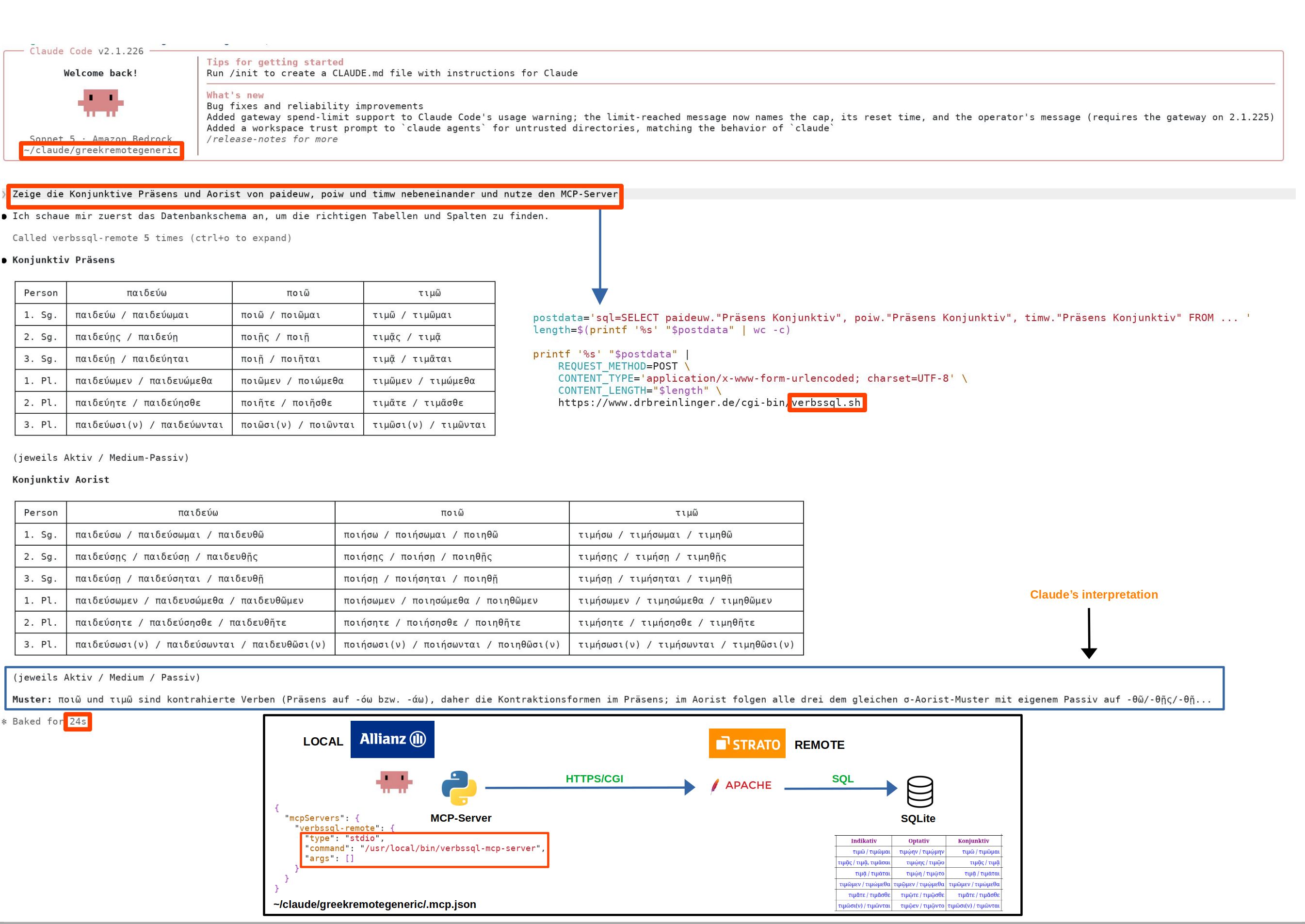
#!/usr/bin/env python3
"""MCP bridge for arbitrary read-only SQL queries via verbssql.sh."""
from __future__ import annotations
import html
import json
import os
import re
import ssl
from html.parser import HTMLParser
from typing import Any
from urllib.error import HTTPError, URLError
from urllib.parse import urlencode
from urllib.request import Request, urlopen
from mcp.server import MCPServer
SERVER_NAME = "verbssql-remote"
DEFAULT_URL = "https://www.drbreinlinger.de/cgi-bin/verbssql.sh"
SERVICE_URL = os.environ.get("VERBSSQL_URL", DEFAULT_URL)
TIMEOUT = float(os.environ.get("VERBSSQL_TIMEOUT", "15"))
mcp = MCPServer(SERVER_NAME)
READ_ONLY_START = re.compile(r"^\s*(?:SELECT|WITH)\b", re.IGNORECASE)
class _TableParser(HTMLParser):
def __init__(self) -> None:
super().__init__(convert_charrefs=True)
self.in_table = False
self.in_cell = False
self.cell_kind: str | None = None
self.cell_parts: list[str] = []
self.current_row: list[tuple[str, str]] = []
self.rows: list[list[tuple[str, str]]] = []
def handle_starttag(self, tag: str, attrs: list[tuple[str, str | None]]) -> None:
tag = tag.lower()
if tag == "table" and not self.in_table:
self.in_table = True
elif self.in_table and tag == "tr":
self.current_row = []
elif self.in_table and tag in {"th", "td"}:
self.in_cell = True
self.cell_kind = tag
self.cell_parts = []
def handle_data(self, data: str) -> None:
if self.in_cell:
self.cell_parts.append(data)
def handle_endtag(self, tag: str) -> None:
tag = tag.lower()
if self.in_table and tag in {"th", "td"} and self.in_cell:
text = html.unescape("".join(self.cell_parts)).strip()
self.current_row.append((self.cell_kind or "td", text))
self.in_cell = False
self.cell_kind = None
self.cell_parts = []
elif self.in_table and tag == "tr":
if self.current_row:
self.rows.append(self.current_row)
self.current_row = []
elif self.in_table and tag == "table":
self.in_table = False
def _ssl_context() -> ssl.SSLContext:
context = ssl.create_default_context()
if hasattr(ssl, "VERIFY_X509_PARTIAL_CHAIN"):
context.verify_flags |= ssl.VERIFY_X509_PARTIAL_CHAIN
return context
def _parse_table(document: str) -> dict[str, Any]:
parser = _TableParser()
parser.feed(document)
if not parser.rows:
# Preserve useful CGI error text if the response is not a table.
text = re.sub(r"<[^>]+>", " ", document)
text = html.unescape(re.sub(r"\s+", " ", text)).strip()
raise RuntimeError(f"CGI response contains no HTML table: {text[:500]}")
first = parser.rows[0]
if first and all(kind == "th" for kind, _ in first):
columns = [text for _, text in first]
data_rows = parser.rows[1:]
else:
columns = []
data_rows = parser.rows
rows = [[text for _, text in row] for row in data_rows]
return {"columns": columns, "rows": rows, "row_count": len(rows)}
def _post_sql(sql: str) -> str:
data = urlencode({"sql": sql}).encode("utf-8")
request = Request(
SERVICE_URL,
data=data,
method="POST",
headers={
"Content-Type": "application/x-www-form-urlencoded; charset=UTF-8",
"User-Agent": "verbssql-mcp/1.0",
},
)
try:
with urlopen(request, timeout=TIMEOUT, context=_ssl_context()) as response:
charset = response.headers.get_content_charset() or "utf-8"
return response.read().decode(charset, errors="replace")
except HTTPError as exc:
body = exc.read().decode("utf-8", errors="replace")
raise RuntimeError(f"CGI returned HTTP {exc.code}: {body[:500]}") from exc
except URLError as exc:
raise RuntimeError(f"Cannot reach CGI service {SERVICE_URL}: {exc.reason}") from exc
@mcp.resource("verbssql://info", mime_type="application/json")
def service_info_resource() -> str:
return json.dumps(
{
"service_url": SERVICE_URL,
"method": "POST",
"content_type": "application/x-www-form-urlencoded; charset=UTF-8",
"field": "sql",
"purpose": "Execute arbitrary read-only SQL against the remote Greek verbs SQLite database.",
},
ensure_ascii=False,
indent=2,
)
@mcp.tool()
def query_sql(sql: str) -> dict[str, Any]:
"""Execute a read-only SQL query through the remote verbssql CGI service.
Send a SELECT or WITH query exactly as SQL. The CGI service performs the
authoritative read-only validation. This MCP bridge additionally rejects
statements that do not begin with SELECT or WITH, then POSTs the SQL in the
form field 'sql' and converts the returned HTML table to structured data.
The MCP server does not contain a hard-coded database schema. If table or
column names are unknown, discover the current SQLite schema through this
same tool before composing the actual query, for example:
SELECT name
FROM sqlite_master
WHERE type='table'
ORDER BY name;
and for a specific table:
SELECT *
FROM pragma_table_info('poiw');
Prefer schema discovery over guessing table or column names.
"""
if not isinstance(sql, str) or not sql.strip():
raise ValueError("SQL query must not be empty")
if not READ_ONLY_START.match(sql):
raise ValueError("Only read-only SQL beginning with SELECT or WITH is allowed")
document = _post_sql(sql)
result = _parse_table(document)
result.update({"sql": sql, "service_url": SERVICE_URL})
return result
if __name__ == "__main__":
mcp.run(transport="stdio")
The final architecture: MCP server and SQLite reside together on www.drbreinlinger.de.
ProxyPreserveHost On

ProxyPass "/mcp/verbs" \
  "http://127.0.0.1:8765/mcp"

ProxyPassReverse "/mcp/verbs" \
"http://127.0.0.1:8765/mcp"User=mcp
Group=mcp
SupplementaryGroups=www-data
ExecStart=.../.venv/bin/python \
.../server.py
Restart=on-failure.mcp.jsonNo local MCP server is required on the client anymore. The following project configuration is sufficient; the bearer token is supplied through VERBS_MCP_TOKEN.
{
  "mcpServers": {
    "greek-verbs": {
      "type": "http",
      "url": "https://www.drbreinlinger.de/mcp/verbs",
      "headers": {
        "Authorization": "Bearer ${VERBS_MCP_TOKEN}"
      }
    }
  }
}~/.codex/config.toml
The same remote MCP endpoint can be connected just as easily from OpenAI's
ChatGPT/Codex environment. The client configuration is reduced to four or
five lines; the authorization value is taken from the environment variable
VERBS_MCP_AUTHORIZATION.
[mcp_servers.greek]
url = "https://www.drbreinlinger.de/mcp/verbs"

[mcp_servers.greek.env_http_headers]
Authorization = "VERBS_MCP_AUTHORIZATION"Claude Code:
Project/.mcp.json
VERBS_MCP_TOKEN=...
ChatGPT / Codex:
~/.codex/config.toml
VERBS_MCP_AUTHORIZATION=...
No local venv
No local DB
No local MCP process/usr/local/lib/verbs-remote-mcp/
server.py
.venv/
/etc/systemd/system/
verbs-remote-mcp.service
Apache VirtualHost:
/mcp/verbs → 127.0.0.1:8765/mcp
/var/www/html/Public/Greek/
verbsdynamic.db#!/usr/bin/env python3
"""Remote MCP server for read-only access to verbsdynamic.db."""
from __future__ import annotations
import os
import re
import sqlite3
import time
from pathlib import Path
from typing import Any
from mcp.server import MCPServer
from mcp.server.transport_security import TransportSecuritySettings
SERVER_NAME = "greek-verbs-sql"
DB_PATH = Path(os.environ.get(
"VERBS_MCP_DB",
"/var/www/html/Public/Greek/verbsdynamic.db",
))
HOST = os.environ.get("VERBS_MCP_HOST", "127.0.0.1")
PORT = int(os.environ.get("VERBS_MCP_PORT", "8765"))
PUBLIC_HOST = os.environ.get("VERBS_MCP_PUBLIC_HOST", "www.drbreinlinger.de")
MAX_ROWS = int(os.environ.get("VERBS_MCP_MAX_ROWS", "500"))
MAX_SECONDS = float(os.environ.get("VERBS_MCP_MAX_SECONDS", "3.0"))
READ_ONLY_START = re.compile(r"^\s*(?:SELECT|WITH)\b", re.IGNORECASE)
mcp = MCPServer(
SERVER_NAME,
instructions=(
"This server exposes a read-only SQLite database through query_sql(). "
"The schema is deliberately not hard-coded. If table or column names "
"are unknown, discover them with SELECTs against sqlite_master and "
"table-valued pragma functions such as pragma_table_info(). "
"Prefer schema discovery over guessing identifiers."
),
)
# Read-only schema PRAGMAs that SQLite may invoke internally for table-valued
# pragma functions such as SELECT * FROM pragma_table_info('poiw').
SAFE_PRAGMAS = {
"table_info",
"table_xinfo",
"index_list",
"index_info",
"index_xinfo",
"foreign_key_list",
}
def _authorizer(
action: int,
arg1: str | None,
arg2: str | None,
dbname: str | None,
source: str | None,
) -> int:
allowed = {
sqlite3.SQLITE_SELECT,
sqlite3.SQLITE_READ,
sqlite3.SQLITE_FUNCTION,
}
if hasattr(sqlite3, "SQLITE_RECURSIVE"):
allowed.add(sqlite3.SQLITE_RECURSIVE)
if action in allowed:
return sqlite3.SQLITE_OK
if action == sqlite3.SQLITE_PRAGMA and (arg1 or "").lower() in SAFE_PRAGMAS:
return sqlite3.SQLITE_OK
return sqlite3.SQLITE_DENY
def _connect() -> sqlite3.Connection:
if not DB_PATH.is_file():
raise RuntimeError(f"SQLite database not found: {DB_PATH}")
con = sqlite3.connect(
f"file:{DB_PATH}?mode=ro",
uri=True,
timeout=2.0,
)
con.execute("PRAGMA query_only = ON")
con.set_authorizer(_authorizer)
deadline = time.monotonic() + MAX_SECONDS
def progress() -> int:
return 1 if time.monotonic() > deadline else 0
# Called every 1000 SQLite virtual-machine instructions.
con.set_progress_handler(progress, 1000)
return con
@mcp.tool()
def query_sql(sql: str) -> dict[str, Any]:
"""Execute one read-only SQLite SELECT/WITH query.
The database schema is not hard-coded into this MCP server. When tables or
columns are unknown, discover the current schema through this same tool.
Examples:
SELECT name
FROM sqlite_master
WHERE type='table'
ORDER BY name;
SELECT *
FROM pragma_table_info('poiw');
Then compose the actual query from the discovered identifiers. Prefer
schema discovery over guessing table or column names.
Only SELECT or WITH statements are accepted. SQLite itself is additionally
opened read-only, query_only is enabled, and an authorizer rejects writes
and unsafe PRAGMAs. Results are capped at MAX_ROWS and execution time is
bounded.
"""
if not isinstance(sql, str) or not sql.strip():
raise ValueError("SQL query must not be empty")
if not READ_ONLY_START.match(sql):
raise ValueError("Only read-only SQL beginning with SELECT or WITH is allowed")
try:
with _connect() as con:
cur = con.execute(sql)
columns = [d[0] for d in cur.description] if cur.description else []
rows = cur.fetchmany(MAX_ROWS + 1)
except sqlite3.OperationalError as exc:
if "interrupted" in str(exc).lower():
raise RuntimeError(
f"SQLite query exceeded the {MAX_SECONDS:g}s execution limit"
) from exc
raise
truncated = len(rows) > MAX_ROWS
if truncated:
rows = rows[:MAX_ROWS]
return {
"columns": columns,
"rows": [list(row) for row in rows],
"row_count": len(rows),
"truncated": truncated,
"max_rows": MAX_ROWS,
}
if __name__ == "__main__":
security = TransportSecuritySettings(
allowed_hosts=[
PUBLIC_HOST,
f"{PUBLIC_HOST}:*",
"127.0.0.1",
"127.0.0.1:*",
"localhost",
"localhost:*",
],
allowed_origins=[
f"https://{PUBLIC_HOST}",
],
)
mcp.run(
transport="streamable-http",
host=HOST,
port=PORT,
streamable_http_path="/mcp",
transport_security=security,
)
The generic remote architecture is consolidated from one MCP installation per database into one shared MCP runtime.
Stage 4 removed the MCP server from the client, but each database still required its own
Python virtual environment, server process, systemd unit, local port, and database-specific
process configuration. Stage 5 removes this remaining operational duplication. All databases
are served by one generic server.py in one virtual environment and by one
mcp.service listening on a single local port.
Internet / MCP clients
  Claude Code · ChatGPT/Codex
              |
              | HTTPS :443
              v
+-------------------------------------------+
| Apache HTTP Server                        |
| TLS termination · Bearer auth · routing   |
+-------------------------------------------+
      |                         |
      | ProxyPass               | ProxyPass
      | /mcp/journal            | /mcp/finance
      v                         v
      http://127.0.0.1:8768/journal/mcp
      http://127.0.0.1:8768/finance/mcp
              \                       /
               \                     /
                v                   v
+---------------------------------------------------------+
| Uvicorn                                                  |
| own HTTP web server, bound only to 127.0.0.1:8768       |
| speaks ASGI to the Python application                    |
+---------------------------------------------------------+
                          |
                          | ASGI
                          v
+---------------------------------------------------------+
| Starlette application                                   |
| routes /journal and /finance to mounted ASGI subapps    |
|                                                         |
|  /journal  -----------------> MCPServer("journal")       |
|       /mcp                     |                        |
|                                +--> journal.yaml         |
|                                +--> journal.db           |
|                                                         |
|  /finance  -----------------> MCPServer("finance")       |
|       /mcp                     |                        |
|                                +--> finance.yaml         |
|                                +--> finance.db           |
|                                                         |
|  /...      -----------------> one MCPServer per DB       |
+---------------------------------------------------------+
                          ^
                          |
                 database.yaml registry
                 (name -> DB + semantics)
Apache is the public-facing web server, but it does not execute the Python MCP application.
After authentication and TLS termination, Apache acts as a reverse proxy and forwards the
request to 127.0.0.1:8768. On that local address, uvicorn is a
separate HTTP server process. It receives the proxied HTTP request and passes it to the
Python application through the ASGI interface. Because Uvicorn is bound to the loopback
address, it is not exposed directly to the Internet.
Apache :443
   | reverse proxy
   v
Uvicorn 127.0.0.1:8768
   | ASGI
   v
Starlette application
Starlette is the lightweight ASGI web framework used here to assemble the complete application. ASGI (Asynchronous Server Gateway Interface) is the asynchronous successor to the older WSGI interface: instead of coupling a Python web application to one specific server, it defines the standard boundary between an ASGI server such as Uvicorn and an asynchronous Python application such as Starlette. This is particularly suitable for MCP's streamable HTTP transport and asynchronous connection/session lifecycle.
HTTP socket
   |
Uvicorn
   |  ASGI protocol boundary
Starlette
   |
mounted MCP ASGI applications
build_app() reads every entry from database.yaml. For each entry,
create_mcp(cfg) creates a distinct MCPServer instance with the same
generic tools, but with its own database file and semantic YAML file captured in
cfg. The server therefore remains schema-independent while each endpoint has
its own semantic and data context.
for cfg in configs:
    mcp = create_mcp(cfg)
    subapp = mcp.streamable_http_app(...)
    routes.append(Mount(f"/{cfg.name}", app=subapp))
Each MCP instance exposes its own streamable-HTTP ASGI sub-application at
/mcp. Starlette mounts that sub-application below the logical database name.
Consequently /journal/mcp and /finance/mcp are handled by different
MCPServer instances even though they run inside the same Python process and behind the same
Uvicorn listener. The Starlette lifespan handler also starts the session manager
of every generated MCP server when the application starts and closes them together when it
stops.
Starlette(routes=routes, lifespan=lifespan)
       |
       +-- /journal --> journal MCP subapp --> /mcp
       +-- /finance --> finance MCP subapp --> /mcp
+-- /... --> ... MCP subapp --> /mcpDatabase selection is no longer encoded in environment variables or separate Python programs. The logical MCP endpoint name is mapped to its SQLite file and semantic model in one declarative configuration file.
databases:
  journal:
    database: /var/www/html/Private/Gruppe_1/journal.db
    semantics: /var/www/html/Private/Gruppe_1/journal.yaml

  finance:
    database: /var/www/html/Private/finance.db
    semantics: /var/www/html/Private/finance.yaml
At startup the generic server reads database.yaml, creates one MCP endpoint
for every configured database, and mounts all endpoints into the same HTTP application.
The SQL and semantic tools are implemented only once.
/journal/mcp  → journal.db + journal.yaml
/finance/mcp  → finance.db + finance.yaml
/.../mcp → ...Public URLs and credentials remain database-specific. Apache performs TLS termination, Bearer-token validation, and URL routing, but no database file path is supplied by the HTTP client.
ProxyPass "/mcp/journal" \
  "http://127.0.0.1:8768/journal/mcp"

ProxyPass "/mcp/finance" \
"http://127.0.0.1:8768/finance/mcp"/usr/local/lib/mcp/
.venv/
server.py
database.yaml
requirements.txt
/etc/systemd/system/
mcp.service
one local port:
127.0.0.1:8768database.yaml instead of copying server code.database.yaml entry, and the corresponding Apache route/authentication
configuration are database-specific.
tar xzf mcp.tgz
cd mcp
sudo ./install.shEdit /usr/local/lib/mcp/database.yaml and add one logical entry for every SQLite database and its semantic YAML file.
Keep the public URLs and per-database Bearer-token rules, but proxy every URL to its corresponding mount on the single local MCP port.
/mcp/journal → 127.0.0.1:8768/journal/mcp
/mcp/finance → 127.0.0.1:8768/finance/mcpsudo systemctl enable --now mcp
systemctl status mcpAfter the corresponding endpoints have been verified, the former database-specific MCP services, virtual environments, and local ports are no longer required.
| Variant | MCP location | DB location | Transport | Schema | Intermediate layer | Deployment unit |
|---|---|---|---|---|---|---|
| A · Local MCP / Local DB (generic) | Client | Client | stdio | fixed + resource | — | per database / client |
| B · Local MCP / Remote DB (limited) | Client | Server | stdio + HTTPS | domain-specific | CGI + HTML | per database / client |
| C · Local MCP / Remote DB (generic) | Client | Server | stdio + HTTPS | dynamic | CGI + HTML | per database / client |
| D · Remote MCP / Remote DB (generic) | Server | Server | HTTPS / MCP | dynamic | Apache reverse proxy | one MCP runtime per database |
| E · Consolidated Multi-Database MCP | Server | Server | HTTPS / MCP | semantic YAML per DB + central registry | Apache reverse proxy | one shared runtime for all databases |
database.yaml is the central deployment registry.
One shared MCP runtime encapsulates process operation, database access, schema discovery,
transport, and security boundaries for all configured databases.